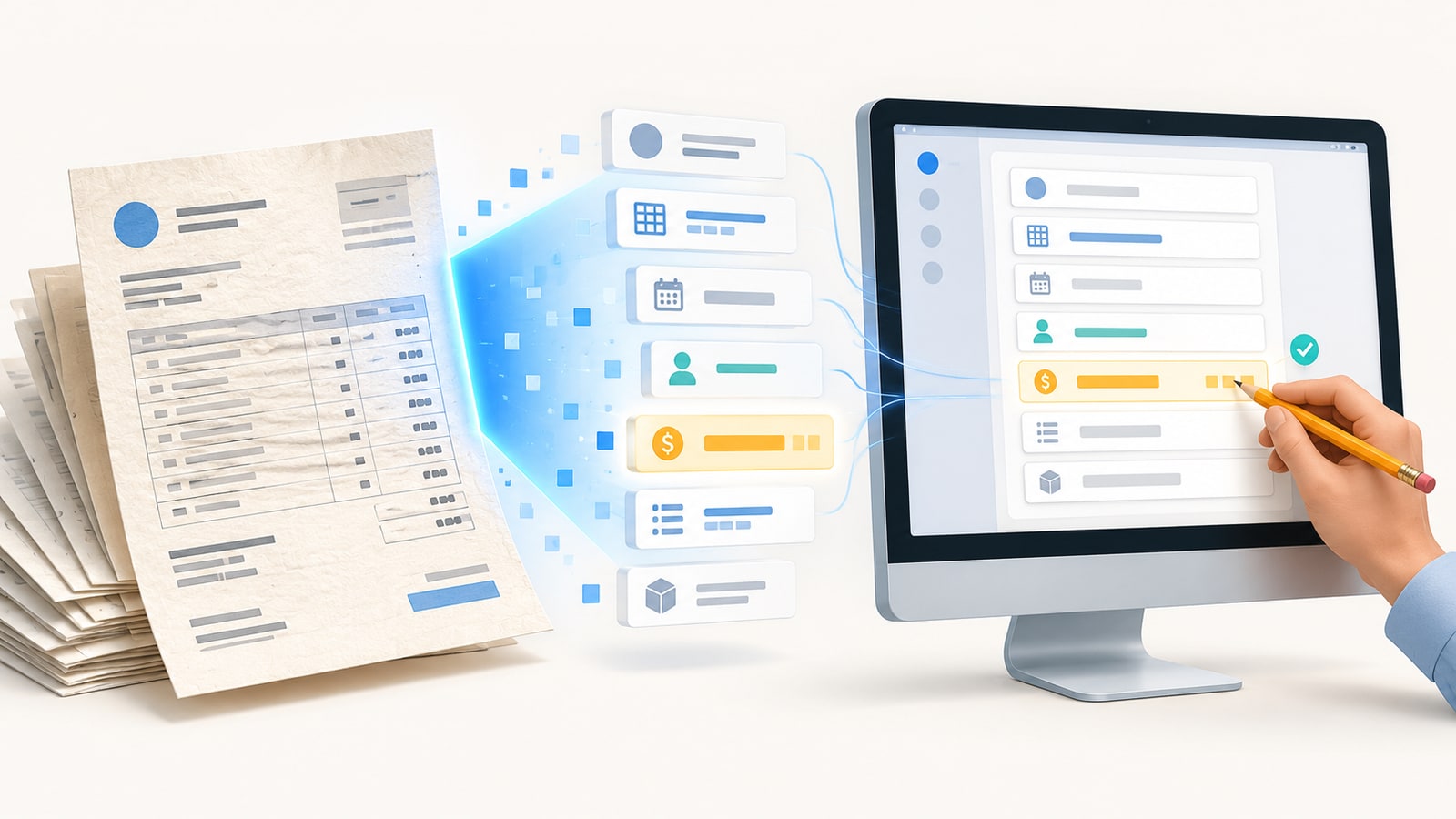
Imagine finding a crumpled invoice at the bottom of your backpack. It has a date, several products, and an important total.
Now imagine copying every detail, one by one, into a spreadsheet.
Does that plan excite you? Probably about as much as organizing a drawer full of cables.
If you own a business, you probably know this situation. Invoices arrive by email, WhatsApp, photographs, and PDF files. Some are perfectly organized. Others seem designed to test your patience.
The good news is that tools exist that can read many of these documents automatically.
Artificial intelligence can help you identify suppliers, amounts, dates, and other important information. That data can then be used to organize records and reduce repetitive tasks.
But how does it actually work?
To understand it, you need to know four concepts: text recognition, information interpretation, confidence levels, and human review.
You do not need to be a technology expert. We will explain it with everyday examples and without complicated words.
1. Digital Eyes: What OCR Is and How It Reads Your Invoices
First, Your Invoice Is an Image
When you receive a scanned PDF, you are often looking at a photograph of a document.
You can zoom in, print it, and email it. However, you may not be able to select its words with your cursor.
To your computer, the letters may simply be shapes inside an image.
The same thing happens when you photograph a receipt after buying materials.
You quickly recognize the store, the date, and the amount. But the software needs to identify those shapes as characters.
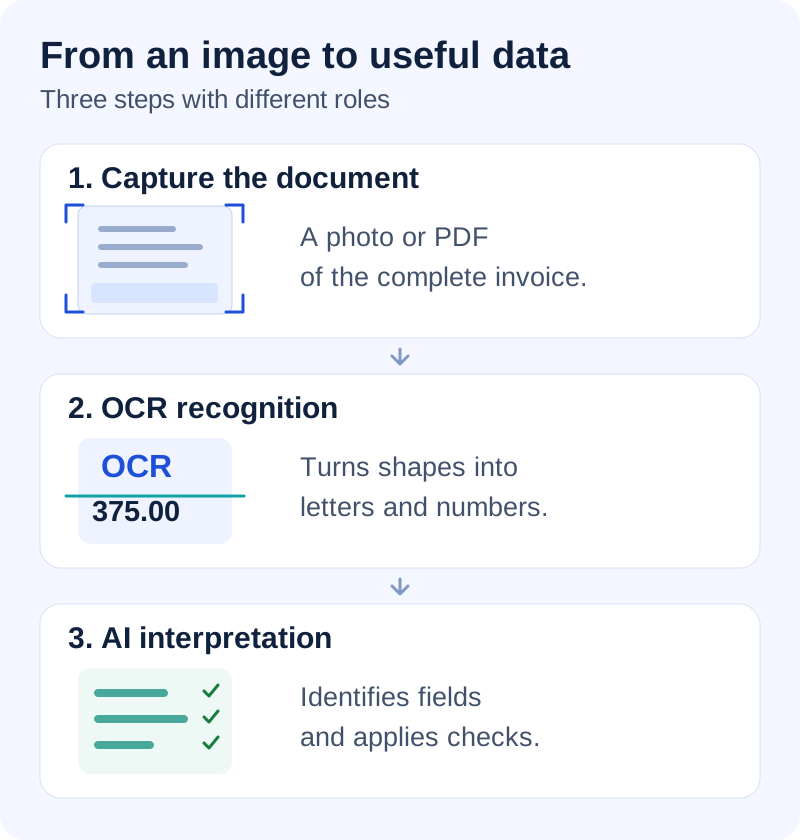
This is where a technology called OCR comes in. Its initials stand for Optical Character Recognition.
In Spanish, it is known as reconocimiento óptico de caracteres.
Its job is to convert letters and numbers in images into digital text.
In other words, it allows your computer to read what it could previously only display.
How Digital Eyes Work
Think of OCR as a detective with a tiny magnifying glass.
First, it examines the image to locate possible areas of text. Then it tries to recognize letters, numbers, and symbols.
Finally, it produces a digital version of the words it found.
For example, imagine an invoice with this information:
Invoice 1048 — Total: $375.00
OCR can recognize those characters and turn them into usable text.
You can then copy the information, search it, or send it to another program.
Modern systems can also use machine learning models.
These models help recognize different fonts, sizes, and document formats.
However, there is an important difference.
Recognizing the number 375.00 does not mean automatically knowing what it represents.
It could be the subtotal, the final amount, or an outstanding balance.
OCR is mainly responsible for recognizing text. Other components must interpret its meaning.
From a Photograph to Organized Information
Suppose you manage a small coffee shop.
Every week, you receive invoices for coffee, milk, cups, and cleaning products.
Some arrive as digital documents. Others end up photographed on your phone.
With OCR, you can turn images into text that can be processed.
An automation system can then try to identify suppliers, dates, products, and amounts.
The validated information could be saved in a spreadsheet or business management application.
You could also search for invoices by supplier name.
That is more practical than checking fifty files called “final_document_2.pdf.”
Another possibility is detecting invoices that appear to be duplicates.
To do that, the system must compare data and apply additional checks.
OCR provides the initial information, but it does not perform all those tasks on its own.
Five Tips for Improving Recognition
OCR works better when it receives clear documents.
A blurry photograph can produce incorrect results. For example, an eight might be confused with a three.
Shadows, glare, and letters that are too small can also cause problems.
You can improve results with five simple habits:
- Place the document on a flat surface.
- Use good lighting and avoid shadows.
- Include the entire invoice in the photograph.
- Hold the phone steady to avoid blurry images.
- Check important details after processing them.
If you receive a PDF with selectable text, you may not need OCR.
Some programs can extract that text directly without analyzing an image.
Using the right tool is also part of automating well.
And remember that your invoices may contain sensitive business information.
Before using a platform, review how it processes and protects your documents.
Technology should make your work easier without neglecting privacy.
2. Reading Is Not the Same as Understanding: The Secret Behind Intelligent Invoices
Your Computer Needs Context
Imagine receiving a five-page invoice.
It has dates, names, addresses, and a surprising amount of fine print.
OCR recognizes the words, but it still needs help identifying their meaning.
Suppose it finds these details:
ABC Company — October 15 — $250 — $25 — $275
Excellent! It has recognized several elements.
But which amount is the subtotal? Which represents taxes? And which is the total?
To answer, the system needs to analyze nearby words and the document's layout.
For example, finding “Total” next to the number 275 provides an important clue.
However, invoices do not always use the same terms.
Some say “Final amount.” Others show “Total due” or “Outstanding balance.”
The technology must consider those differences before classifying the data.
Reading an amount and understanding its role are two different tasks.
The Mystery of Different Totals
Invoices have a curious habit: showing several important numbers at the same time.
You may find subtotals, taxes, discounts, advance payments, and additional charges.
They all seem relevant, but they serve different purposes.
Imagine this invoice:
- Subtotal: $200
- Taxes: $16
- Discount: $10
- Total: $206
OCR can correctly recognize all four amounts.
Another component then needs to identify each field.
An intelligent system can connect the numbers with their labels. It can also check whether the calculations add up.
In this example, adding taxes and subtracting the discount produces $206.
That check helps detect possible errors.
However, real documents can be more complicated.
What happens when there is an advance payment? Or when amounts appear in two currencies?
A system that simply selects the largest number could get it wrong.
That is why good automation needs to interpret the structure of each invoice.
Dates and Names Matter Too
Think of a seemingly simple word: “date.”
An invoice may include several.
The issue date indicates when the document was generated.
The due date indicates when payment is required.
There could also be a delivery date.
If the system confuses those dates, you could receive an incorrect reminder.
Something similar happens with business names.
A document may show the supplier, the customer, and the company handling the shipment.
Recognizing those names does not mean automatically identifying who needs to pay.
There are also differences between countries.
Some documents use commas as decimal separators. Others use periods for the same purpose.
For example, “1.250” can be interpreted in different ways depending on the format used.
These differences seem small, but they can affect significant amounts.
How an Intelligent System Interprets Data
An invoice processor can combine OCR, rules, and artificial intelligence models.
First, it receives the document and recognizes its text.
Then it tries to identify the important fields.
Some systems analyze the position of the data on the page.
Others use nearby words, tables, and relationships between amounts.
AI models can also recognize patterns learned during training.
The system could then build a record with this information:
Supplier: ABC Company
Invoice: 1048
Date: October 15
Subtotal: $200
Taxes: $16
Discount: $10
Total: $206
Now the information has names and roles.
This allows it to be used in later processes.
For example, you can organize expenses by supplier or prepare administrative summaries.
You could also identify documents that need attention before recording them.
But there is something you should remember.
Artificial intelligence can interpret a piece of data incorrectly, even when the text was recognized perfectly.
Imagine an invoice showing the order number next to the invoice number.
The system could confuse them and save the wrong identifier.
It could also select an amount before a discount is applied.
That is why it is a good idea to include additional checks.
It is not about distrusting all technology, but about detecting important errors.
From a Disorganized Document to a Useful Record
Now imagine that you manage a store.
Every week, you receive documents from different suppliers.
Without organization, you end up searching for invoices among emails, messages, and folders.
With an automated process, each document can follow a sequence.
First, the file is received. Then the text is recognized and the fields are identified.
Next, important details are checked.
If an inconsistency appears, the system can request a review.
Finally, the validated information can be saved in the appropriate system.
This makes it easier to locate documents and prepare reports.
It can also reduce the manual work of copying information.
The key is to combine reading, interpretation, and verification.
It is like reading a recipe.
Recognizing the words is necessary, but you also need to understand the instructions.
Exactly the same thing happens with invoices.
3. When AI Is Unsure: How to Interpret Its Confidence Levels
What Does a Confidence Score Mean?
Imagine a friend showing you a blurry photograph.
You tell them it probably shows a cat.
However, it could also be a small dog with a rather strange haircut.
You are not completely sure.
Something similar happens when artificial intelligence analyzes documents.
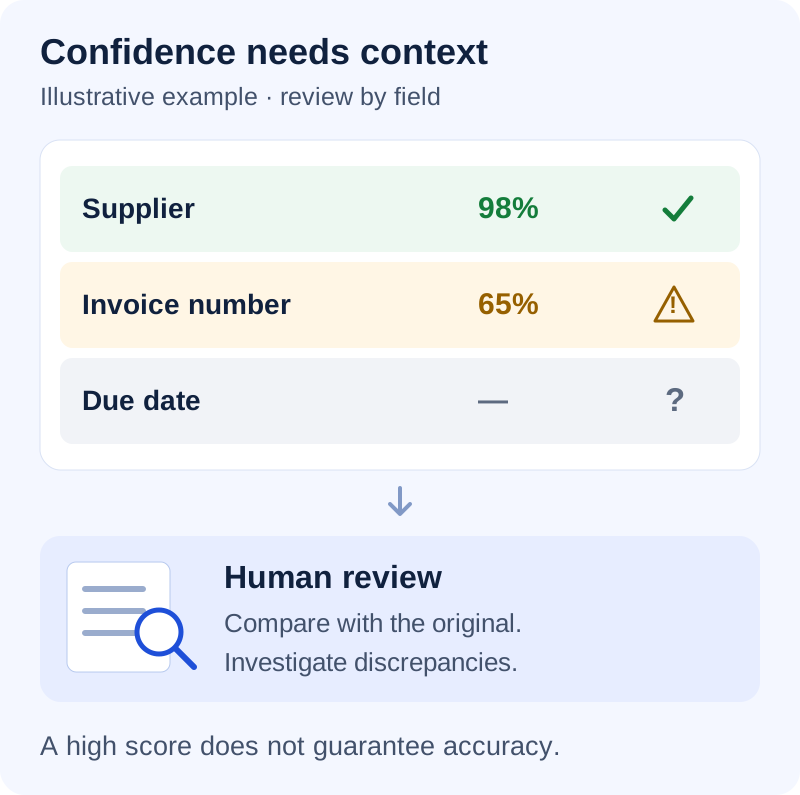
Some systems assign a confidence score to the recognized data.
This score indicates how certain the system considers a result to be.
For example, a tool could identify a supplier with 98% confidence.
By contrast, it might assign only 65% to the invoice number.
This indicates that the second result has greater uncertainty.
However, there is an important detail.
98% confidence does not guarantee that the data is correct.
Nor does it necessarily represent a real 98% probability of being right.
The interpretation depends on the model and how it calculates its scores.
That is why these indicators should be used as a guide, not as a guarantee.
Why Do Some Invoices Create Uncertainty?
Not all documents arrive in ideal condition.
Some look as if they have just come out of a professional printer.
Others look like photographs taken during an earthquake.
Image quality can affect recognition.
Imagine photographing a receipt while walking to your car.
The image comes out blurry, and a shadow covers the amount.
The system could identify the store correctly but get the amount wrong.
There are also invoices with overlapping stamps, handwriting, or complicated tables.
These details can increase uncertainty.
But a blurry image is not the only cause.
Sometimes the document is perfectly legible, and its information is ambiguous.
For example, it may show a subtotal, a previous balance, and an outstanding total.
The system could recognize all three numbers without correctly identifying their roles.
That is why uncertainty can arise during reading or during interpretation.
The Confidence Traffic Light
Imagine your system using three colors to flag its results.
Green identifies data that appears sufficiently reliable.
Yellow indicates information that deserves a second look.
Red flags fields that need attention before continuing.
You could set these rules as an example:
- Green: confidence of 95% or higher.
- Yellow: confidence between 80% and 94%.
- Red: confidence below 80%.
These percentages are illustrative.
There is no universal scale that works correctly for every tool.
The thresholds should be adjusted after testing the system with real documents.
Also, not all fields are equally important.
A small error in a description may be easy to correct.
An incorrect amount could directly affect your money.
That is why important financial data may need additional controls, even with high scores.
The goal is not to decorate the screen with pretty colors.
The goal is to quickly identify which information needs attention.
When One Number Changes the Whole Story
Suppose you manage a construction company.
You receive an invoice for materials totaling $1,850.
However, a stain covers part of the first digit.
Your system interprets the amount as $7,850.
What a difference!
Imagine approving that amount without checking the original document.
To reduce these risks, you can include validation checks.
For example, the system could compare the total with the subtotals and taxes.
It could also flag unusual amounts compared with previous purchases.
But a different amount does not always mean there is an error.
Perhaps you bought more materials because you landed an important project.
Alerts should prompt investigation, not automatically reject legitimate documents.
Your knowledge of the business remains essential.
What Happens When Information Is Missing?
Sometimes the problem is not incorrect data.
Information is simply missing.
Imagine an invoice without a visible due date.
The system recognizes the issue date but cannot find when payment is required.
What should it do?
The safest option is usually to mark the field as unknown.
Inventing a date would be much worse than acknowledging that information is missing.
Some AI systems can produce convincing responses even when they lack sufficient data.
That is why a reliable process must distinguish between data that was found and data that was assumed.
It is also a good idea to keep a reference to the original document.
That way, you can quickly check where each value came from.
If information is missing, you can complete it manually or request a clearer version.
Acknowledging uncertainty is not a weakness.
It is a way to prevent problems before they grow.
How to Check Whether You Can Trust Your System
Before automating hundreds of documents, start with a small test.
Select real invoices that represent the formats you normally receive.
Include digital files, photographs, and documents with different layouts.
Then compare the extracted data with the originals.
Pay special attention to amounts, dates, suppliers, and invoice numbers.
Record the errors you find.
Also observe whether confidence scores help identify incorrect results.
If important errors appear with high scores, you need to investigate.
You may need to adjust the validation rules or evaluate another tool.
You do not need to become a data scientist.
You just need to measure the results and learn from them.
After all, even robots should be able to admit that they need help.
4. The Role of Human Review: Why Automation Still Needs Your Eyes
Your System Knows the Data; You Know the Business
Imagine having an assistant capable of organizing a hundred invoices in one morning.
It identifies suppliers, extracts amounts, and classifies documents without asking for vacation time.
It sounds wonderful.
But what happens when an invoice contains correct information that does not match what was agreed?
Suppose you receive a repair invoice for $850.
The document is perfectly scanned.
Your system correctly recognizes the supplier and the amount.
However, you remember that the technician had quoted only $600.
That difference deserves a conversation before approving payment.
Perhaps there was a legitimate additional charge. Or perhaps there was an error.
Technology can show you the information.
Your experience allows you to understand the context.
That is why automating does not mean eliminating all human decisions.
It means spending less time on repetitive tasks and paying more attention to exceptions.
Five Details That Deserve a Second Look
Not all invoice fields carry the same risk.
A small error in a description could be easy to correct.
An incorrect amount could directly affect your finances.
That is why it is a good idea to pay special attention to five details.
1. Supplier Name
Check that it belongs to a company you actually work with.
2. Total Amount
Verify that it matches the agreed products, services, and terms.
3. Due Date
Make sure it has not been confused with the issue date.
4. Invoice Number
This identifier can help you recognize duplicate documents.
5. Payment Details
An unexpected change in bank account deserves independent verification.
These checks do not have to be performed manually from scratch.
An automated system can prepare the information and highlight possible inconsistencies.
That way, you can focus on the fields that need attention.
Not All Invoices Need the Same Review
Imagine you own a store and receive documents from different suppliers.
Some invoices are for small, routine purchases.
Others are for expensive equipment or unusual services.
Should you review all of them in exactly the same way?
Probably not.
You can organize reviews according to risk.
For example, routine invoices could go through automatic checks and periodic reviews.
By contrast, large amounts could require additional authorization.
You could also always review documents from new suppliers.
Invoices with incomplete or contradictory information should receive special attention.
The thresholds will depend on the size and operation of your business.
There is no universal amount that works for everyone.
What matters is establishing clear rules and periodically checking that they work.
An unsupervised system can repeat the same error for a long time.
When an Invoice Looks Like a Duplicate
Suppose you receive two invoices from the same supplier.
Both have similar amounts and dates close together.
Your system identifies them as possible duplicates.
Should you delete one immediately?
Not necessarily.
Perhaps you bought the same materials on two occasions.
It could also be a corrected invoice.
The alert flags a match, but you still need to investigate.
You can compare invoice numbers, purchase orders, and delivery receipts.
If there is any doubt, you can also contact the supplier directly.
Useful automation should show you why it identified a possible inconsistency.
That way, you can make decisions with sufficient information.
The goal is to prevent errors without unnecessarily slowing down your operations.
How to Create a Simple Review Routine
You do not need to organize endless meetings to review your documents.
You can start with a practical procedure.
First, define which tasks the system will perform automatically.
Then identify which ones require human approval.
You also need to establish who will review exceptions.
If you work alone, that will probably be you.
If you have employees, you can distribute responsibilities according to their roles.
It is a good idea to keep a record of important decisions.
That way, you can know who approved a document and when it happened.
It is also useful to record corrections and significant changes.
For example, if someone changes an amount, there should be a way to investigate what happened.
A good routine should make work easier.
It should not become another mountain of administrative tasks.
Errors Can Help You Improve
Suppose your system repeatedly confuses two suppliers with similar names.
Every week, you need to correct the same information.
That can be frustrating.
But it also represents an opportunity to improve the process.
You may need to add another rule to tell them apart.
You could also change the configuration or use better examples, depending on the tool.
What matters is recording recurring errors.
Then check whether the adjustments actually improved the results.
You can compare documents processed before and after the change.
That way, you will avoid relying solely on impressions.
Remember that some problems require better rules, not necessarily a different AI model.
Security Needs Oversight Too
Invoices may include sensitive business information.
Some show addresses, banking details, or personal information.
Before automating, check where those files will be processed and stored.
You also need to define who can access them.
An employee responsible for recording invoices may not need to change banking details.
Similarly, reading a document should not automatically authorize a payment.
Separating these responsibilities can reduce errors and risks.
It is also a good idea to periodically check permissions and activity logs.
Automation can make these controls easier.
However, decisions about security remain your organization's responsibility.
How to Know Whether Automation Actually Works
Good automation should produce results you can verify.
You can start by measuring how much time you currently spend processing invoices.
Then compare that time with the time needed after implementing the system.
Also record how many documents require corrections.
Observe which ones have errors most frequently.
If too many invoices need manual intervention, you may need to improve the process.
But you should not assume everything works just because no warnings appear.
Periodically select some processed documents and compare their data with the originals.
This allows you to detect errors that went unnoticed.
You do not need complicated charts to get started.
A spreadsheet can help you record times, incidents, and improvements.
With that data, you can decide which tasks are worth automating further.
And which ones still need human oversight.
Conclusion: The Best Automation Knows When to Ask for Help
An invoice is much more than a collection of letters and numbers.
It contains information about purchases, expenses, payments, and business relationships.
OCR allows images to be converted into text.
Intelligent systems can then interpret that text and organize it into useful fields.
Confidence levels help flag results that need attention.
And human review makes it possible to check situations where context matters.
When these pieces work together, you can reduce repetitive tasks and organize your documents better.
But you do not need to automate absolutely everything from day one.
You can start with a few documents, check the results, and gradually improve the process.
Artificial intelligence can help you work faster.
Your experience is still needed to make responsible decisions.
The best automation is not the kind that never needs human help. It is the kind that knows when to ask for it.
That way, you can benefit from technology without losing control of your business.
And perhaps, finally, you can spend less time chasing invoices and more time on what really matters.